
How CryptoLocker changes the way we backup
Recently a new type of ‘Ransomware’ has started to appear, It’s called CryptoLocker and it needs to be taken very seriously.
CryptoLocker is a form of “Ransomware” These programs take over your computer and will return tho control to you when you pay money. In the past these types of programs were successfully removed fairly easy and your files were still intact. CryptoLocker has changed things.
CryptoLocker typically arrives via a email attachment claiming to be an email attachment, usually it looks like a .pdf file. because Microsoft in their infinite wisdom *snort* by default hides file extensions the a file that is “badthings.pdf.exe” actually looks like “badthings.pdf”. Clicking the pdf means you have launched the exe program.
It will run in the background and encrypt all your data files, including documents, photos, videos etc. Since you don’t have the key to unencrypt them you are unable to access your data. It will then pop a message up on your screen giving you 72 hours to pay up (usually $100 or more) to get access to the decryption key. If you don’t pay up then the decryption key is deleted and it will be impossible to get your files back. The encryption key is complicated enough the even brute force attempts to break it could take thousands of years.
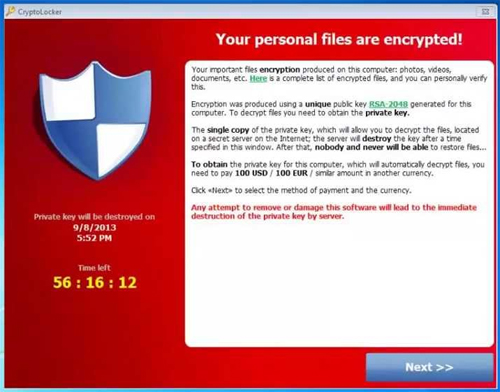
The more serious problem is that Cryptolocker will attempt to encrypt files on any drive letters is finds, not only local drives inside your computer but external usb drives or even NAS drives on your network if connected using a drive letter.
This means we have to review the way we do backup to include a ‘cold’ backup. This means a backup that is stored offline so it cannot be accesses. If you follow good backup guidelines you typically have an offsite backup away from your computer. However if you are using an cloud-based backup service, your files that are now encypted would be automaticlly backed up and you would still not be able to recover them.
The best solution is a seperate backup to an USB drive that is then unplugged from the computer. You may be doing this already for larger files that are not feasable to backup to a cloudbased service. The frequency and what is being backed up to that external drive needs to be reviewed. In many cases depending on the importance of the data, having 2 external drives and swapping them on a daily basis may be required.
At the very least, if you are backing up to only a cloud backup server and/or a NAS, having a small external drive that you can backup to and then unplug until the next backup may be the way to go.
As always practicing safe computing will also help reduce the risk. A quick review
- Change the Windows default to show file extensions. A guide is here.
- Don’t open attachments you are not expecting
- If the attachment is link based (eg from your bank) do not click the link. Go to the bank’s website manually.
- Use and update antivirus software.
- Backup frequently.


Leave a Reply