
On adware and such
Recently I’ve had a increase in work involving computers running very slow as well as unwanted pop ups and default search page selection being changed. In almost all cases it’s adware
And in many cases the user has installed it unintentionally
Wikipedia defines Adware as
The term adware is frequently used to describe a form of malware (malicious software),[19][20] usually that which presents unwanted advertisements to the user of a computer.[21][22] The advertisements produced by adware are sometimes in the form of a pop-up.[23]
When the term is used in this way, the severity of its implication varies. While some sources rate adware only as an “irritant”,[24] others classify it as an “online threat”[25] or even rate it as seriously as computer viruses and trojans.[26] The precise definition of the term in this context also varies.[c] Adware that observes the computer user’s activities without their consent and reports it to the software’s author is called spyware.[28]
I consider instrusive software to be any software that is installed without clearly informing the user. One very common example of how this malware gets on a system is as part of and update to existing software.
One of the most common of those is during an upgrade to Java. During the upgrade the following screen will come up.
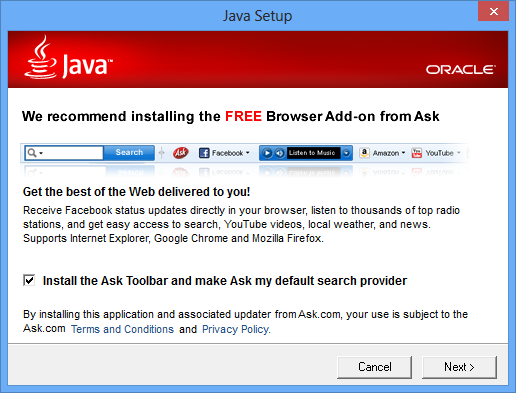
Legally no laws have been broken but what does a browser add-on have to do with Java? These companies are relying on the fact that most people just keep clicking “Next” when installing software without reading what is happening on the screen. In this case if you don’t uncheck the box asking you to install the tool bar, it will be installed and will be an pain to remove.
Why do software developers bundle adware with their software? Mostly because it’s the only way they can be paid. As the internet grew we became accustomed to getting software for free. For every high quality app there seemed to be several others that people wrote for fun and would give away. The software was good enough and people did not want to pay.
Enter some ad companies who approached the developers and said, “We will pay you but you have to bundle our software in with yours.” These days for even large companies it’s a fairly easy revenue stream.
Now how to prevent it. A few simple steps.
- Watch whats coming up on the screen when you install a program or an upgrade. Almost all the time you will be given the option to opt out of the extra software. Don’t just click next.
- If given a choice between a default or a custom install, select the custom install. I have seen some cases where the opt out option is only in the custom installs. Yes it takes a moment or two longer but it is well worth it over having to try and remove it later.
- If prompted to install a tool to help your computer run faster, ignore it. If you are still not convinced then do a quick google search to see what reviews are out there for the tool in question.
- Run backup and use windows restore points fequently. If you have installed something that is not wanted, going back to the most recent restore point will usually solve the problem.
Following these simple steps should help you in dealing with this very annoying problem.

Leave a Reply